
If you're running Google Ads for a WooCommerce store and your conversion tracking isn't right, every single decision you make on top of it is at risk of being wrong.
You might think a campaign has a great ROAS when in reality it's counting duplicate purchases. You might be killing a campaign that's actually driving sales because the Purchase event isn't firing properly. On an account that runs on automated bidding, bad data means bad learning.
Conversion tracking isn't a technical detail. It's the foundation every budget, bidding, scaling and profitability decision sits on top of.
Want us to check whether your WooCommerce tracking is actually right? At Qutik we audit Google Ads, GA4, WooCommerce purchases and enhanced conversions before recommending any budget increase. Book a free tracking audit and find out if your conversions are reliable.
What a WooCommerce store should measure
For Google Ads, the most important conversion is the purchase.
But it's not enough to just have a conversion action called "Purchase". The setup needs to correctly capture:
- the purchase itself,
- the order value,
- the currency,
- the transaction / order ID,
- the source of the conversion,
- the attribution model,
- and, where possible, enhanced conversions.
If revenue is passed incorrectly, ROAS will be wrong. If the order ID isn't used properly, you'll end up with duplicates. If the conversion is imported from GA4 but the attribution or timing is off, campaign performance can be quietly distorted.
Google Ads tag vs GA4 import?
A common question is whether to measure purchases with the Google Ads tag directly, or to import conversions from GA4.
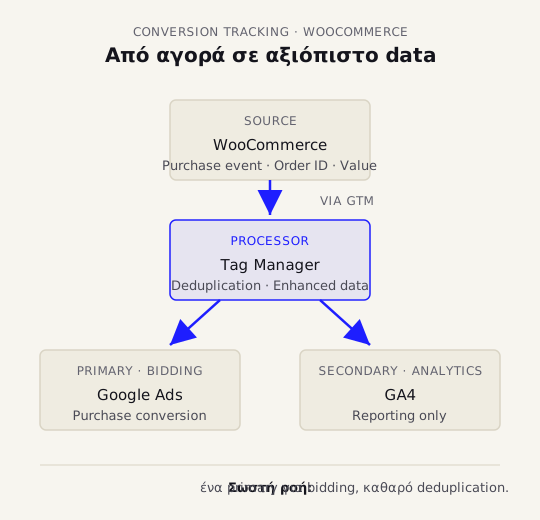
For performance optimisation, the cleaner option is usually a dedicated Google Ads purchase conversion action — especially when you need fast, reliable signal for bidding.
GA4 is excellent for analytics and cross-channel analysis, but it isn't always the best single source of conversion data for bidding.
What matters is knowing exactly which conversion action is set as primary for bidding and which ones are secondary for reporting only.
If you have multiple primary purchase conversions, you're at high risk of double-counting.
Problem 1: Double-counting conversions
On WooCommerce sites, double-counting is very common.
It happens when:
- you have both a Google Ads tag and a GA4 purchase import set as primary,
- you have a plugin sending conversions plus a parallel GTM setup,
- the thank-you page fires again on refresh,
- the same purchase is being captured from multiple sources,
- transaction ID isn't being used correctly to deduplicate.
The result is inflated revenue and a fake ROAS.
If Google Ads is reporting 80 purchases over a period and WooCommerce shows 40 actual orders for the same window, you don't have a performance result. You have a tracking problem.
Problem 2: Wrong revenue value
The Purchase conversion needs to pass a value.
But the value needs to follow a consistent business logic. You need to decide whether you're sending:
- total order value,
- value excluding shipping,
- value excluding VAT,
- or another logic that matches your reporting.
What matters most isn't finding the one "magic" answer that fits everyone. It's being consistent.
If you send gross revenue today and net revenue tomorrow, the data isn't comparable.
Problem 3: Enhanced conversions aren't properly active
Enhanced conversions help Google improve conversion matching by sending hashed first-party data, where it's allowed and properly implemented.
On WooCommerce, this can be done via the Google tag, GTM, a plugin, or a server-side setup, depending on your architecture.
You need to verify:
- that they're actually active,
- that they're receiving data,
- that there are no warnings in the diagnostics,
- that data collection respects consent rules,
- that the implementation doesn't violate the site's privacy setup.
Enhanced conversions on its own doesn't mean "tracking is perfect". It's one piece of the overall setup.
Problem 4: Wrong primary/secondary conversions
In Google Ads, not every conversion should drive bidding.
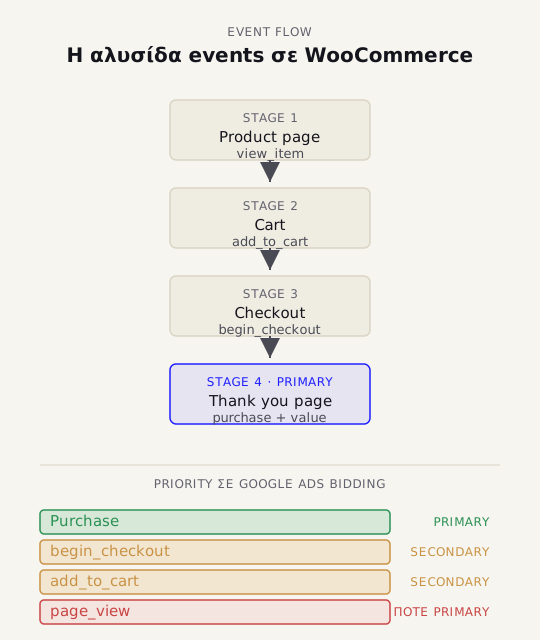
For e-commerce, the typical structure is:
- Purchase: primary
- AddToCart: secondary
- BeginCheckout: secondary
- Page views: never primary for e-commerce sales bidding
If you optimise for AddToCart while what you actually want is purchases, you can train the system to bring you users who add items to cart but never buy.
Problem 5: Thank-you-page tracking on its own
Many WooCommerce setups rely entirely on the thank-you page firing the conversion.
That can work, but it carries risk:
- payment redirects,
- page refreshes,
- users returning to the thank-you page,
- failed payments,
- gateways that don't complete the redirect cleanly,
- cache conflicts.
This needs to be tested with real orders and reconciled against actual WooCommerce orders.
Practical validation checklist
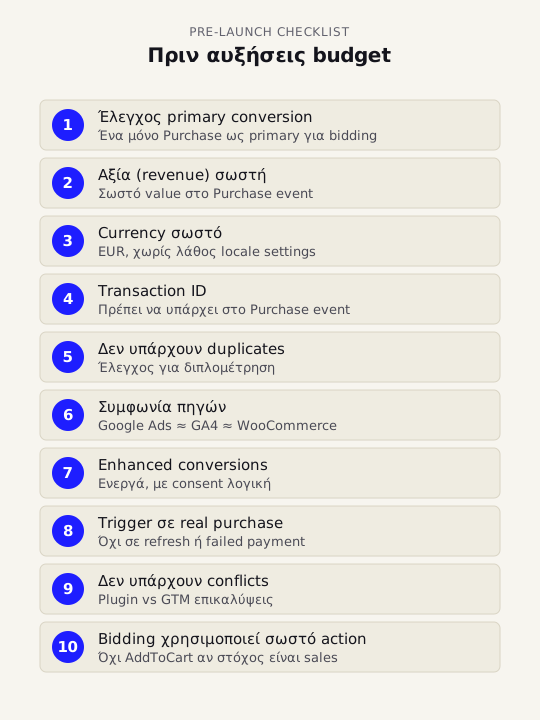
Before you increase budget, verify:
- Is there only one primary Purchase conversion?
- Is the Purchase passing the correct value?
- Is the currency right?
- Is the transaction ID being passed?
- Are there any duplicate conversions?
- Do Google Ads, GA4 and WooCommerce numbers roughly agree?
- Are enhanced conversions active and clean?
- Does Purchase only fire on a real, completed order?
- Are there any plugin/GTM conflicts?
- Is bidding using the correct conversion action?
Conclusion
Google Ads conversion tracking on WooCommerce needs to be clean before you talk about ROAS, budget or scaling.
If you're measuring incorrectly, you're optimising incorrectly. If you're optimising incorrectly, your budget burns faster.
The right setup measures real purchases, the correct revenue, the right currency, a unique transaction ID, and avoids double-counting. If you're running both Google Ads and Meta Ads, both tracking setups need to be clean before you can fairly evaluate performance.
FAQ
How do I know if Google Ads is correctly tracking WooCommerce purchases?
Place a test order, check the Google Ads conversion action, the revenue and the transaction ID, and reconcile against the actual WooCommerce order. If the numbers don't agree to within ±5 – 10%, there's a problem.
Should I use the Google Ads tag or GA4 imports?
For bidding, a dedicated Google Ads purchase conversion action is usually preferable. GA4 is very valuable for analytics, but you need to be deliberate about which conversions are primary and which are secondary.
Why do I see more conversions in Google Ads than actual orders?
Likely causes are duplicate tags, multiple primary conversion actions, thank-you-page refreshes, plugin conflicts or a missing transaction ID.
What are enhanced conversions?
A Google feature that improves conversion matching by sending hashed first-party data, when properly implemented and with correct consent handling.
Which conversion should be primary in e-commerce Google Ads?
Usually Purchase. Events like AddToCart or BeginCheckout can be secondary for analysis, but shouldn't drive bidding.