
You're spending €1,500 a month on Meta Ads. The clicks come in. Engagement looks fine. But at the till, the picture doesn't add up. You're not alone.
In more than 6 out of 10 accounts we audit, the problem isn't the ads. It's something else in the funnel — and it's almost always one of the 7 things we'll cover below. This guide isn't theory. It's the exact checklist we run on every new account before touching campaign settings.
At the end of each section you'll find the specific places to look in Ads Manager or Events Manager — you can run the entire check in 30 minutes, without external help.
Before you start: get read-only access to your Meta Business Manager (if you don't have it already). Every check below is read-only — you're just reading data, not changing anything.
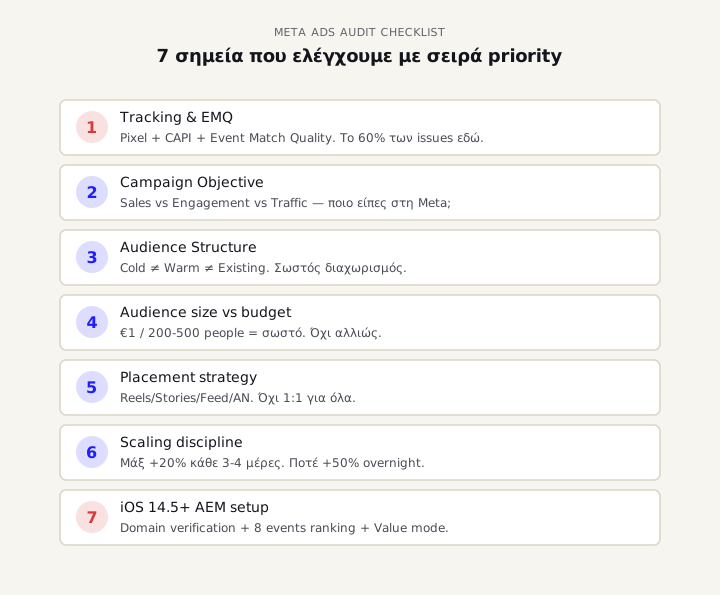
1. The problem is tracking, not the ads
If we had to pick one reason Meta Ads underperform, this is it. In 60% of accounts we audit, campaign performance looks bad because Meta isn't seeing the conversions that are actually happening.
Think about it from the algorithm's perspective: Meta shows your ad to 1,000 people. 30 buy. But due to iOS 14.5+ and browser tracking restrictions, only 12 of those 30 purchases register on the Pixel. The algorithm thinks the creative is mediocre — so it stops showing it to similar audiences. ROAS drops. And you probably change the creative, when the actual problem is in tracking.
What to check
Go to Events Manager → Data Sources → your Pixel and look at 3 things:
- Event Match Quality (EMQ) score per event. If your Purchase event is below 6.5/10, you're losing 30-50% of actual conversions in attribution.
- Conversions API status: if it says "Set up Conversions API" or "Pixel only", you're almost 100% losing data. Since April 2021 (iOS 14.5), browser-only tracking averages 30-60% data loss.
- Aggregated Event Measurement (AEM) rankings: if you haven't set Purchase as event #1 in your priority list, Meta won't optimise for it correctly on iOS users.
If any of the three is red, don't touch anything else until you fix this. The ads might actually be working — you're just not seeing the truth.
Going deeper: we've written a complete guide to Meta Conversions API setup after iOS 14 covering 4 implementation paths from easy to advanced.
2. Wrong campaign objective for what you actually want
One of the most common mistakes we see: business owner wants sales, but has campaign objective set to Engagement or Traffic because "the clicks are cheaper".
Problem: when you tell Meta "I want engagement", Meta searches for the 5% of people who like/comment on everything. Those aren't buyers. They're almost always the same 50,000 users in any given country who engage with anything that appears. You get cheap CPC, but near-zero conversion rate.
When you say "I want Sales", Meta searches for people through lookalike data of your actual buyers. CPC is higher, but revenue per click is 5-10x.
What to check
In Ads Manager → Campaigns, look at the "Objective" column:
- For sales → it must say "Sales" (formerly "Conversions")
- For leads → it must say "Leads"
- For brand awareness → "Awareness" or "Reach"
- Don't keep it on "Engagement" or "Traffic" if your goal is sales. Ever.
If you saw "Engagement" on a campaign that's supposed to drive sales — that's the problem. It's not the creative. It's not the audience. It's that from step one, you told the algorithm the wrong goal.
3. Funnel targeting that doesn't separate cold from warm
The second most common cause of failure: one campaign for everyone. Cold prospects who don't know you, warm prospects who saw your site in the last 30 days, and existing customers — all in the same ad set.
This is like asking restaurant servers to use the same plate for the starter, main and dessert. Technically it works. But no one comes back.
Cold prospects need to learn why you exist (story-driven creative, problem/solution framing). Warm prospects (visited site, abandoned cart) need a reason to come back (specific product, time-limited offer, social proof). Existing customers need upsell/cross-sell (complementary products, loyalty rewards).
If you show them all the same creative, you lose all three.
What to check
In Ads Manager, filter to active campaigns and look at:
- How many ad sets per campaign? If you have 1 ad set running "interests + lookalike + retargeting" mixed — that's a problem.
- Distinct retargeting campaigns? You should have at least:
- 1 cold acquisition campaign (Sales objective, lookalike audiences)
- 1 retargeting campaign (Sales objective, custom audience: site visitors last 30 days)
- 1 cart abandoner campaign (if you're e-commerce)
- Different creative per stage: cold creative shouldn't be the same as retargeting creative.
If all your spend is in one ad set running "Greek e-shop shoppers + Site visitors + Page fans", you're almost certainly paying premium prices to existing customers for clicks they would have made anyway.
4. Reckless "scaling" that breaks the algorithm
The most painful problem: campaign is performing well, business owner increases budget +50% or +100% overnight because "it's working, let's push it", and the next day ROAS drops 60%. What happened?
Meta's learning phase is real, not marketing buzzword. When you change budget by more than +20% within 24h, the algorithm goes back into learning. While in learning, performance is more unstable — because it tests new users and placements to find the new optimal.
In practice: a campaign that did 5x ROAS at €50/day might do 1.5x ROAS at €100/day for the first 7-10 days after you changed the budget. If you panic and revert to €50, learning phase starts again. You're in an infinite loop.
What to check
Go to Ads Manager → Campaign view and look at the "Delivery" or "Status" column:
- If it says "Learning" on an ad set running >7 days → not enough events collected. Tracking issue or budget too low.
- If it says "Learning Limited" → it'll never exit learning. You need to either increase budget, broaden audience, or fix tracking.
- If it says "Active" → you're out of learning, you can think about scaling.
Scaling rule: maximum increase 20% every 3-4 days. To go from €50 to €200/day, it takes 2-3 weeks, not 2 days. Otherwise, you're in learning phase again from the start.
5. iOS 14.5+ damage that was never fixed
April 2021. iOS 14.5 launched. App Tracking Transparency. Nearly 70% of iPhone users said "No" to the tracking prompt. The entire Meta advertising industry lost visibility into a massive chunk of its inventory.
Meta responded with Aggregated Event Measurement (AEM) — a system letting you track only 8 events per domain, in priority order. If you haven't set it up correctly, you lose almost all iOS conversion data.
The problem: 4 years later, half the Greek accounts we see haven't properly set up AEM. Their Pixel is technically "active", but for iOS users it loses 30-50% of actual conversions.
What to check
Go to Events Manager → Aggregated Event Measurement → Configure Web Events:
- Verified domain? If not, you'll see a "Verify your domain" warning. Has to be done first.
- Your 8 events ranked? Purchase should be #1 in the list (highest priority). If it's below views/leads, Meta optimises for the wrong event on iOS users.
- Events have "value" optimization? For e-shops, the Purchase event should be in "Value" mode, not "Standard" — otherwise you can't run Value Optimization (VO) campaigns, which are 30-40% more profitable.
If none of the three is right, you're still running campaigns on lost data. No matter how good your creative is, on iOS users — the most profitable Greek demographic — you're not seeing the truth.
Depth: the AEM update in June 2025 changed the game completely. We've covered exactly what it means for Greek e-shops — with 4 implementation paths from DIY to server-side.
6. Creative that doesn't match the placement
Even the best Meta Ads creative won't perform if you run it on the wrong placement. This is one of the most underrated issues we see.
Creative that works on Stories (vertical 9:16, urgent CTA, fast-paced) is completely different from what works on Feed (square 1:1, more text, slower-paced). Even more different from Reels (vertical, native UGC feel, no salesy tone) or Audience Network (which almost never performs — that's why we almost always exclude it from all campaigns).
Problem: 80% of business owners we see put the same creative on all placements (Advantage+ Placements ON, single asset). Result: Meta serves the creative across all of them, but none is optimised for the specific placement.
What to check
In Ads Manager → Ad set level → Placements section:
- Do you have "Advantage+ Placements" ON or manual placements? If ON, check whether you have at least 3 different creative formats per ad (vertical, square, optionally horizontal).
- Running on Audience Network? If yes, disable it. 9 out of 10 accounts that have it ON are losing money there. Traffic is low-quality, click farms, accidental clicks in apps.
- Have vertical video for Reels/Stories? If not, you're missing the cheapest and highest-quality placement Meta has right now.
If you run 1 single 1:1 creative across all placements, Meta auto-crops it and serves you lower-quality assets on vertical placements. Click-through-rate drops 30-50% on Stories and Reels — and those are Meta's biggest audiences for 2026.
7. Audience too small for your budget
Last cause we see often: mismatch between budget size and audience size. This is a math problem most people ignore.
Think of it this way: if you have an audience of 500,000 people in Greece and a budget of €15/day, Meta serves your ad to ~3,000 people/day (at average CPM). How many times will it reach the same 500,000? Over 6 months for 1 impression on average. Reality: it never reaches everyone. It goes to a small subset, frequency builds up, ad fatigue starts.
On the other hand: audience of 20,000 people with budget €100/day = frequency 5-10 within a week = ad fatigue in 7 days = ROAS drops.
The right ratio is roughly €1 budget per 200-500 people audience for e-commerce. Smaller ratio = under-delivery. Larger = ad fatigue.
What to check
In Ads Manager → Ad Set level → Audience Size:
- Look at "Estimated Audience Size" Meta shows. If it's "Very Broad" (>2M) and you have budget <€30/day, it's not a serious campaign — Meta can't find the right people with that little spend.
- Conversely: if it's <50K and you have budget >€80/day, you'll see frequency hit 7-10 within 2 weeks. That's a sign of ad fatigue — ROAS will drop soon.
- Is the ad set running with a "Frequency" warning? Meta warns you when audience is too small for your spend. If you see the warning, either grow audience or reduce budget — otherwise you're burning money.
If you just increased budget and ROAS dropped, the first thing to look at isn't the creative — it's whether the audience size can support the new budget.
The workflow we run on every audit
To not keep all this in your head, here's the right order we follow for every new account:
- Tracking first (Sections 1, 5) — if these are broken, no other improvement will show.
- Campaign objective check (Section 2) — easy check; if wrong, start there.
- Audience structure (Section 3) — if you don't separate cold/warm, nothing else works.
- Audience size vs budget math (Section 7) — simple math, but no one does it.
- Placement strategy (Section 6) — if creative doesn't match placements, you're losing free performance.
- Scaling discipline (Section 4) — never +50% overnight.
The insight: nearly all of these are operational issues, not creative. Creative is the most visible problem, but rarely the actual cause. 6 out of 7 above have nothing to do with how "pretty" your ad looks.
When Meta Ads aren't to blame
Worth noting: sometimes the ads are doing their job, but there's a problem after the click. These don't get fixed in Ads Manager:
- Slow site loading (>3 sec mobile = 50% bounce before even seeing the product)
- Bad mobile checkout (too many steps, small buttons, no Apple/Google Pay)
- Wrong landing page (generic category page instead of specific product)
- Out-of-stock products in the catalog still running on Meta (this happens often)
- Shipping costs eating margins (free shipping threshold that's not respected)
If you've checked all 7 above and they're fine, but ROAS stays low, the problem is post-click in your funnel. Analyse the checkout flow, page speed, and product availability before blaming Meta.
Next step
If you read all 7 sections and identified 1-2 — great, you now know where to focus. Fix those first, and you'll see improvement within 2-4 weeks.
If you read and you're sure you have 4-5 of these in parallel — that means the account needs a rebuild from scratch, not patches. That option requires 2-3 weeks of proper work, not "tweaks".
If you're not sure which one applies to you: send us read-only access to your Meta Business Manager. In a 30-minute call we'll tell you exactly what we see, where the spend is leaking, and whether it makes sense to work together. Free, no commitment.
Meta Ads are difficult. But most problems we see in Greek accounts aren't "Meta doesn't work in Greece" — they're one of the 7 things above.