
In 2021, Apple released iOS 14.5 with App Tracking Transparency (ATT). Over 70% of iOS users tap "Don't Allow" when asked whether Meta can track them. Since then, the numbers you see in Meta Ads Manager are partially fiction.
Not deliberately — but because the Pixel is singing with a cracked voice. And it's costing your campaigns.
Let's look at exactly what's happening, why the Pixel alone isn't enough anymore, and how the Conversions API (CAPI) can win back 15-25% of lost attribution.
The problem with Pixel-only tracking
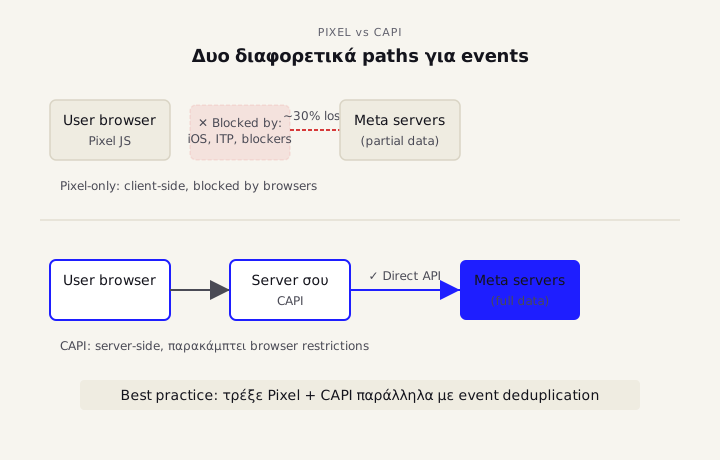
The Meta Pixel is client-side tracking — JavaScript that runs in the user's browser. That means it gets blocked by:
- Apple App Tracking Transparency (iOS 14.5+) — ~70% opt-out rate
- Safari Intelligent Tracking Prevention — deletes cookies in 24 hours
- Ad blockers (uBlock Origin, Brave, Privacy Badger) — block the Pixel entirely
- Firefox Enhanced Tracking Protection — default for all users
- Chrome cookie deprecation — coming end of 2026
The result? Real Shopify case studies show 30% attribution drop-off after iOS 14.5 (source: Ingest Labs CAPI guide).
In practice: if you're running €5,000/month in ad spend and your Pixel is missing 30% of conversions, Meta is getting wrong signals. The algorithm optimizes against biased data — optimizing for users who don't use privacy protection (Android, non-Safari browsers, no ad blockers). This algorithmic blind spot costs 15-25% in your final ROAS.
What the Meta Conversions API (CAPI) is
CAPI is server-side tracking. Instead of relying on the user's browser, it sends events directly from your server to Meta's servers. It bypasses:
- Browser restrictions
- Ad blockers
- Cookie deletion
- iOS privacy controls
When a customer completes a purchase, your server: 1. Captures the event (order ID, revenue, customer email, phone) 2. Sends a direct API call to Meta — no browser dependency 3. Meta receives the conversion data — no cookie issues
Meta now recommends a hybrid setup: Pixel + CAPI in parallel, with event deduplication so the same conversion isn't counted twice.
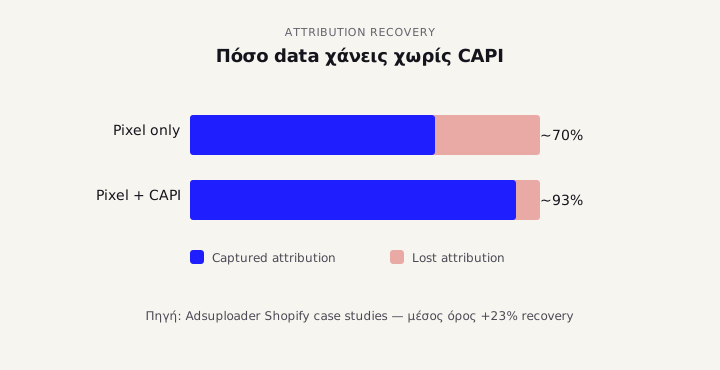
From real Shopify implementations: CAPI typically recovers 23% of the lost signal that Pixel alone misses (source: Adsuploader Meta CAPI guide).
What changed in June 2025: Aggregated Event Measurement
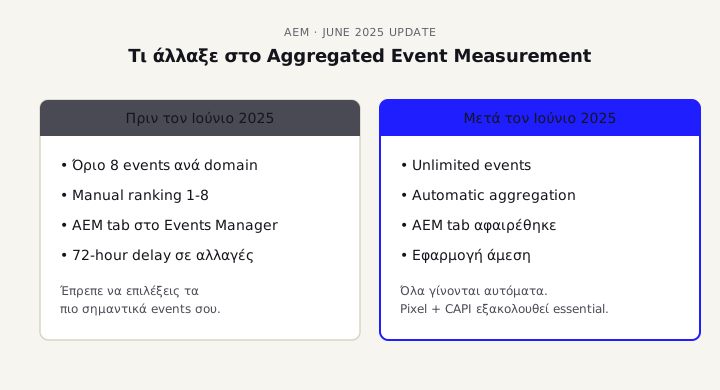
Beyond CAPI, there's also Aggregated Event Measurement (AEM) — the system that replaced the old 8-event prioritization. In June 2025, Meta made a significant change: they removed the 8-event limit and the mandatory manual prioritization (source: Conversios.io Meta AEM guide).
Today: - All eligible events are recognized automatically - You no longer need to pick a 1-8 ranking - The AEM configuration tab in Events Manager has been removed - Pixel + CAPI continues to be essential
Simpler, but doesn't replace CAPI. AEM models opt-out users; CAPI improves event delivery.
How to set up CAPI — step by step
There are 4 implementation paths, depending on your technical setup:
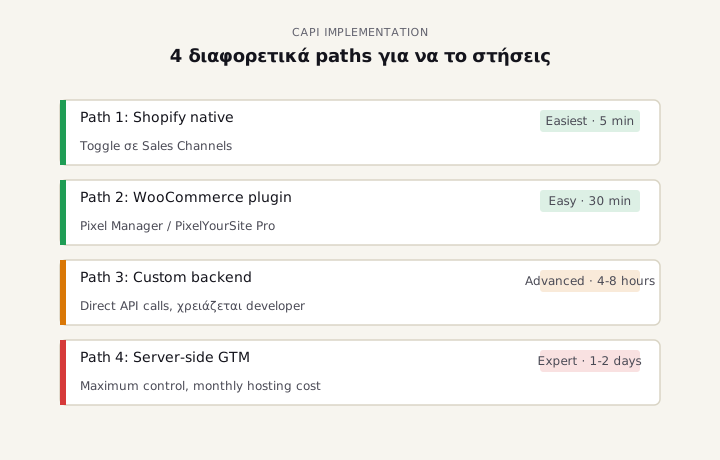
Path 1: Native Shopify integration (easiest)
If you're on Shopify: 1. Go to Sales channels → Facebook & Instagram 2. Connect Facebook account → Connect Pixel 3. Enable Conversions API automatically in the toggle 4. Verify in Meta Events Manager (Test Events tab)
Shopify automatically sends standard events: PageView, ViewContent, AddToCart, InitiateCheckout, Purchase.
Path 2: WordPress / WooCommerce with plugin
If you run WooCommerce, the main options are: - Pixel Manager for WooCommerce — free version covers basics - PixelYourSite Pro — €99/year, better for advanced events - Pixel Caffeine — free, basic
You install, then provide: - Pixel ID - CAPI Access Token (get it from Events Manager → Settings → Conversions API → Generate Token) - Dataset ID
Important: enable Advanced Matching in the plugin. It sends hashed email + phone + address along with events, which raises Meta's Event Match Quality (EMQ) score.
Path 3: Custom backend with direct API calls
If you have a custom platform, you'll need a developer to write code that:
1. Captures conversions on the server
2. Hashes PII (email, phone) with SHA-256 (privacy requirement)
3. Sends a POST request to https://graph.facebook.com/v18.0/{pixel_id}/events
4. Includes an event_id matching the corresponding Pixel event (for deduplication)
Documentation: Meta Conversions API technical guide.
Path 4: Server-side Google Tag Manager (advanced)
The most sophisticated setup. A server-side GTM container that receives events from the browser and forwards them to Pixel + CAPI + GA4 + whatever else. Gives you full control but requires setup and monthly hosting (€5-30/month depending on traffic).
Event Match Quality (EMQ) — the metric that matters
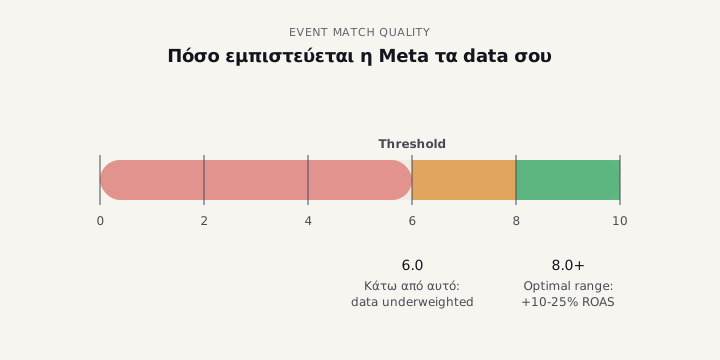
EMQ is the 0-to-10 score Meta gives you for how well it can match your events to Facebook users.
Threshold: EMQ below 6.0 means the algorithm distrusts your data and underweights it during optimization.
How to raise it: - Pass email with every event (hashed) - Pass phone wherever available - Pass first name + last name + city + country - If you have an External ID (customer ID from your CRM), include it - Hash everything with SHA-256 before sending
Real-world data: brands with EMQ 8.0+ see 10-25% ROAS improvement within 30-60 days (source: Adsuploader CAPI implementation guide).
How to verify it's working correctly
Go to Events Manager → Data Sources → Test Events. Check:
-
Events fire from two sources: "Browser" (Pixel) + "Conversions API" (CAPI). If you only see one source, CAPI isn't working.
-
Deduplication is working: the dashboard will show "1 event from 2 sources" — this means Pixel and CAPI are sending the same event with matching
event_idand Meta is counting it as one. -
Event Match Quality 6.0+: go to Diagnostics tab → see the EMQ score per event.
-
No errors in Diagnostics: if warnings appear (missing parameters, malformed events), fix them.
About GDPR
CAPI does not exempt you from GDPR. On the contrary:
- You need explicit user consent before sending PII (email, phone) to Meta
- If you use a cookie banner like Cookiebot, Iubenda or OneTrust — make sure the CAPI integration respects the consent state
- Best practice: CAPI works with Google's Consent Mode v2 and Meta's Limited Data Use (LDU)
If you're not sure your consent flow is set up correctly, book an audit.
Conclusion
In 2026, Pixel-only tracking is a dead zone. If you're running Meta ads without CAPI:
- Your reported metrics are 20-30% below reality
- Meta's algorithm optimizes against biased data
- You're paying more for the same results
CAPI isn't a nice-to-have anymore. It's fundamental infrastructure for anyone running serious Meta budget. Setup time: 2-8 hours depending on your platform. ROI: almost always positive within 60 days.
If you're not sure your tracking is working correctly, or you want to know how much data you're losing, book a free audit. We've seen accounts recover 25%+ ROAS just from getting CAPI set up properly.
Sources
- Meta Conversions API: Complete Setup & Optimization Guide 2026 — Adsuploader
- Meta CAPI Setup Guide 2026 — Ingest Labs
- Meta Aggregated Event Measurement (AEM) Explained 2025 — Conversios.io
- iOS 14.5 Meta Ads Recovery Strategies (2025) — Munalytics
- Meta Conversions API official documentation — Meta Developers