
Every time we onboard a new client, there's almost always the same question: "Why don't we just throw a Performance Max campaign in there and let the AI do the work?".
We get it. Performance Max is what Google pushes hardest. There's literally a banner in the Google Ads interface nudging you toward it. Over 1 million advertisers use Performance Max globally (source: Google Ads & Commerce blog, April 2025).
But for new accounts — meaning accounts without solid conversion history yet — Performance Max usually isn't the right first move. We run it later, at the right moment, with the right setup. Not on day one.
Here's why.
What Performance Max is (quickly)
Performance Max is Google's AI-driven campaign type that runs automatically across all Google properties: Search, YouTube, Display, Discover, Gmail, Maps. You give it assets (images, videos, headlines, descriptions) and conversion goals — and Google's AI decides where, when and to whom to show your ad.
It's "automatic transmission" if older Search/Shopping campaigns were "manual gear". For some jobs it's ideal. For others, it drives you off a cliff.
The problem with new accounts
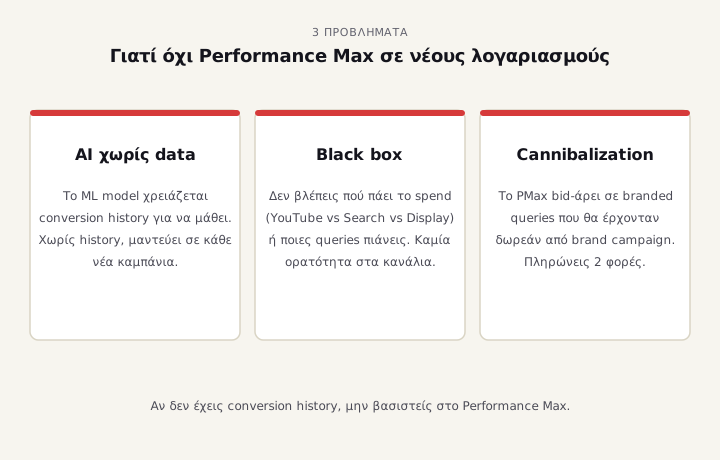
1. The AI needs data to learn — you don't have it
Performance Max uses machine learning to predict which users will convert. That model needs conversion data to train on. When you start a new account with no conversion history, the AI is guessing.
According to an Adalysis audit covering 3,300 campaigns, Performance Max performs worse than dedicated Search campaigns when both are eligible for the same queries — especially in accounts without mature data. PMax works best as a complement, not a replacement.
In practical terms: for the first 2-4 weeks on a new account, Google's AI literally wastes part of your budget on non-converting traffic while it figures out what works.
2. You don't have the transparency to understand what's going wrong
Until 2025, Performance Max was effectively a black box. January 2025 brought campaign-level negative keywords (advertisers' #1 complaint). November 2025 added channel performance reporting for all PMax campaigns (source: Google Ads Highlights of 2025).
But even now:
- You can't control how much spend goes to YouTube vs Search vs Display
- Not all search terms are visible — you mostly see "search themes"
- You can't exclude audiences with the precision normal campaigns offer
- Asset group reporting shows which creative performs, but not the full picture
When PMax starts burning budget, it's hard to see where exactly. On mature accounts with quarters of data, that's manageable. On a new account it's like driving with your eyes closed.
3. PMax cannibalizes brand searches
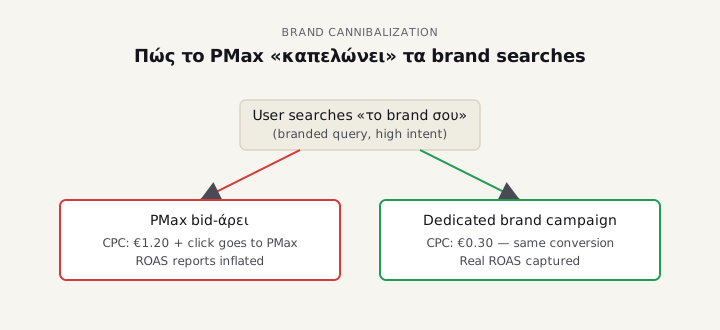
This is the sneakiest one. Performance Max bids aggressively on branded queries — when someone searches your brand name. This inflates the reported PMax ROAS (because branded traffic almost always converts), but you lose money because you're paying for clicks that would have come for free or at much lower cost from a dedicated brand campaign.
In an Optmyzr audit, 71% of accounts had PMax cannibalizing brand traffic to a degree that made PMax appear to deliver much higher ROAS than it actually was. We unpack the full pattern in Performance Max & branded searches: are you paying for free clicks?.
What we do instead on new accounts
Concrete steps we follow with new clients:
Week 1-2: get tracking right
Before you spend anything, make sure:
- Google Ads conversion tracking is properly set up — not just GA4 imports. The Google Ads tag captures conversions differently from GA4 (Google reports ~10-20% more conversions captured via native tag vs imported GA4 conversions).
- Enhanced conversions is enabled with hashed customer data
- For e-commerce: passing actual revenue + transaction ID, not placeholders
If those terms don't mean anything yet, book an audit. 90% of the Greek accounts we see have tracking issues.
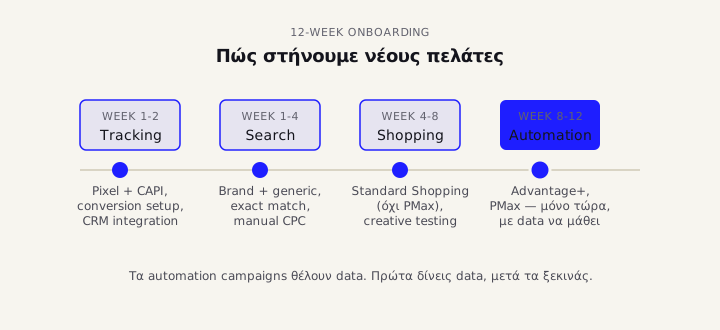
Week 1-4: Search campaigns with exact match
Not "Maximize Conversions" from day one. We start with:
- Brand campaign: Search campaign on brand keywords only, manual CPC, low bids. Cheap ROAS, clean brand defense.
- Generic Search campaign: 5-15 exact-match keywords we know are searched by high-intent users. Manual CPC or Maximize Clicks with daily budget cap.
- Negative keywords list: extensive from day one, refreshed every 3 days.
The goal here isn't to scale. It's to build the conversion history that will later feed Smart Bidding.
Week 4-8: Shopping campaigns (if e-commerce)
If you sell products, we run Standard Shopping in parallel — not PMax Shopping. Standard Shopping gives you product-level reporting, search term insights and the level of control PMax doesn't. Standard Shopping still works in 2025 alongside PMax, and a new rule applies: if you run Standard + PMax together, PMax is no longer automatically prioritized — Ad Rank decides (source: Google Ads Help, November 2025).
Week 8-12: Performance Max — now it actually pays off
Once you have: - 50+ conversions/month in the account - Clear idea which products/services have highest margin - Clean audience signal data - Solid asset library (10+ headlines, 5+ images, ideally 1-2 videos)
then you add PMax — not as replacement but as supplement to the search funnel:
- Add campaign-level negative keywords from day one (all brand competitors, "free", "cheap", "used", anything you don't sell)
- Set search themes that reflect mature learnings from your Search campaigns
- Audience signals from hashed customer lists — not interest-based broad targeting
- Brand exclusion list so PMax doesn't cannibalize the dedicated brand campaign
When PMax-first does make sense
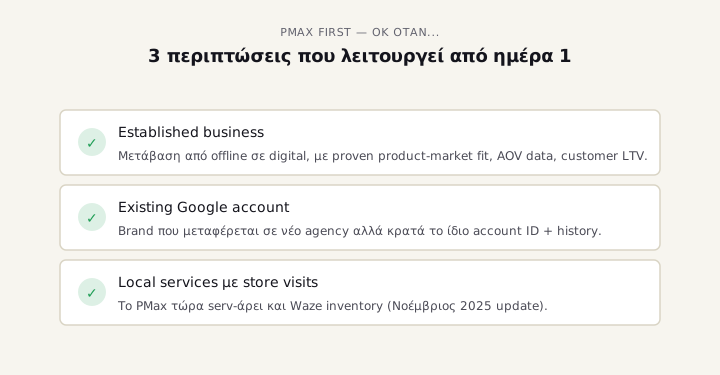
Not all accounts are the same. There are cases where PMax-first works:
- Established business moving spend from offline to digital with already proven product-market fit, AOV data, customer LTV
- Brand with existing Google account history transitioning to a new agency/manager but keeping the same account ID
- Local services with a store visits goal where PMax now also serves Waze inventory (November 2025 update)
But for the typical Greek SMB starting from zero — new account, no history, no data — go slow, build structure. PMax is a tool, not a savior.
Conclusion
Performance Max is a fine campaign type. It's just not for day one on a new account. With new clients we work in this order:
- Tracking set up correctly
- Brand + Generic Search with exact match
- Standard Shopping (if e-commerce)
- PMax only when there's data to feed it properly
The price? Slower start. Less reach in the first week. The benefit? Better data, better decisions, and — what really matters — you don't burn budget on black-box optimization before the AI knows what it's doing.
If you're running PMax now and wondering whether you're routing brand searches through it instead of a dedicated brand campaign, or whether your ROAS is inflated by branded traffic — start with the 9 most common PMax mistakes that burn budget, or see how an audit works with us. 30 minutes call, we tell you what we see.
Sources
- Google Ads Performance Max — Complete Guide 2025 (Dataslayer.ai)
- Google's November 2025 Performance Max Updates — Waze Ads and Channel Reporting
- Google Ads Highlights of 2025 — Official Help Center
- About Performance Max campaigns — Google Ads Help
- PMax & Standard Shopping interaction update — Google Ads Help