
The pattern is almost always the same. E-shop owner sends us a message: "I've been running Google Ads for 6 months, spending €1,500/month, I see clicks but sales are minimal. What am I doing wrong?"
In 80% of cases, the ads are doing their job. They're bringing people to the site. The problem is somewhere else — usually one of the 6 things we'll cover below. This guide is the checklist we run on every e-shop audit, with specific places to look and exactly what to change.
Before you start: you need access to Google Ads (read-only is fine), Google Analytics 4, and your e-shop backend (Shopify, WooCommerce, Magento, anything else). All checks take 45 minutes if you have credentials handy.
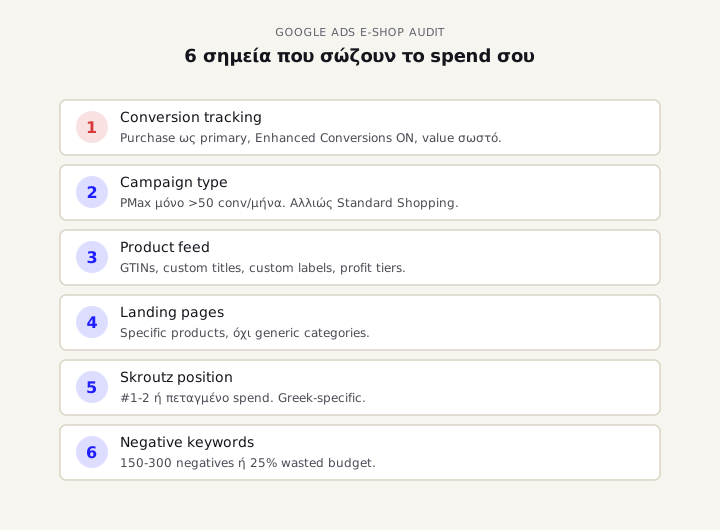
1. Wrong campaign type for your stage
Google wants you running Performance Max for everything. It pushes it relentlessly in the dashboard, in suggestions, in emails. Problem: PMax isn't the right campaign type for every e-shop, and especially not for new accounts.
Based on our experience and WordStream data, PMax needs at least 50 conversions/month to exit learning phase and perform well. If your e-shop does 20 sales/month, PMax will burn budget on wrong audiences for 3-6 months before it "learns" — if it ever does.
The right sequence for new/small e-shops:
- Standard Shopping first (3-6 months, until you build real conversion data)
- Search campaigns on high-intent branded and category keywords in parallel
- PMax only when you have at least 30-50 conversions/month consistently
- Remarketing at whatever stage your funnel is in
The problem is most e-shop owners start straight with PMax because Google told them "it's new, it's better". Result: 3 months of wasted budget, and the algorithm hasn't gathered enough data to perform.
What to check
In Google Ads → Campaigns, look at:
- Are you running PMax? If yes, in the Performance tab look at total conversions for the last month. If it's <30, PMax doesn't have enough data — pause it, restart with Standard Shopping or Search.
- Do you have Standard Shopping? If you don't, and your e-shop is <100 conversions/month, that should be your core campaign.
- Do you have a branded Search campaign? Many forget and let competitors bid on their brand name. If people search for you by name and see a competitor ad first, you're losing customers.
We've written in detail about why Performance Max shouldn't run on new accounts — with 4 specific scenarios where PMax is wrong. If PMax is already running and you're not sure why it's underperforming, see the 9 mistakes that quietly burn PMax budget.
2. Product feed nobody optimised
The product feed is the most underrated part of Google Shopping. Truly. More important than bidding, more important than budget. If the feed is bad, no campaign optimisation will deliver results.
The pattern we see in Greek e-shops: feed is auto-exported from Shopify or WooCommerce without custom optimisation. Result: products don't show up for relevant searches, or show up but lower in ranking.
3 things to change in your feed today:
Custom product titles
The default Shopify/WooCommerce title is something like "Black Leather Women's Cross-Body Handbag". This isn't how users search.
Greek users search for "γυναικείο τσαντάκι ώμου μαύρο δερμάτινο" — basic category first. Keywords that match search queries need to be in the first 70 characters of the title, because Google primarily uses those for matching.
Right format: - [Basic category] [size/colour] [brand] [extra details] - Example: "Women's shoulder bag black leather · Brand X · Cross-body"
Custom labels for profitability tiers
Google allows 5 custom labels in the feed (custom_label_0 through custom_label_4). These aren't visible to the user — they're for campaign segmentation. Almost no Greek e-shop owner uses them.
As a minimum: - custom_label_0 = profit tier: high_margin / mid_margin / low_margin - custom_label_1 = season: evergreen / seasonal / clearance - custom_label_2 = bestseller flag: true / false (top 20% by sales)
With these you can build Shopping campaigns by profit tier — increase budget on high-margin products, lower bids on low-margin or loss-leaders.
GTIN, brand, and category
Google downranks products without GTIN in many categories (especially apparel, electronics, beauty). If your e-shop doesn't have them, your products show up in fewer auctions.
Brand and Google Product Category also matter. "Apparel & Accessories > Clothing > Shirts" is right. "Tops" alone is not.
What to check
In Google Merchant Center → Products → All products:
- Disapproved/warning items: if you have >5% of your catalog in warnings, those products don't show up.
- Missing GTINs: filter for "GTIN: missing" and see how many. If >20%, serious problem.
- Title length: if your titles are <50 characters, you're losing keyword coverage.
- Custom labels: if you don't have them set up, you can't do proper campaign segmentation.
3. Conversion tracking measuring the wrong events
Another common problem: the e-shop measures "Add to Cart" as primary conversion, not "Purchase". Google optimises for whatever event you tell it. If you tell it to optimise for add-to-carts, it will bring people who click add-to-cart — not necessarily people who buy.
We see this in 40% of Greek e-shops we audit. Conversion tracking is set up on the wrong event, and Google does exactly what the owner told it — but the owner actually wanted purchases.
Enhanced Conversions for Greek e-shops
After iOS 14.5 and Chrome's 3rd party cookie restrictions, standard conversion tracking loses 20-30% of actual purchases. Enhanced Conversions is Google's fix: it sends hashed customer email/phone to Google along with the conversion, for better matching.
Based on our experience with Greek accounts, Enhanced Conversions increases reported conversion volume by 15-25%. This means Google sees the real sales, optimises correctly, ROAS improves.
The problem: setup requires Google Tag Manager + custom JavaScript to send the email/phone to the conversion tag. It's not one-click from Shopify (although Shopify+ has native integration). Greek e-shops ignore this — and lose 20% of data. If you're on WooCommerce specifically, see our deep-dive on Google Ads conversion tracking on WooCommerce with a 10-point validation checklist.
What to check
In Google Ads → Tools → Conversions:
- Primary conversion action: must be Purchase, not Add to Cart, not Begin Checkout.
- Conversion value tracking: must have value per conversion (not static value, but transaction value from the e-shop).
- Enhanced Conversions status: must be "Enabled". If it's "Eligible" but not enabled, you're losing 15-25% from iOS users.
- Cross-domain tracking: if you have checkout on a different domain (e.g. Shopify checkout subdomain), check that tracking transfers correctly.
4. Landing page mismatch killing conversion rate
E-shop owner runs a search ad for "blue Nike running shoes". Click → user lands on the "Athletic Shoes" category page with 350 products. User has to search again to find blue Nike. 60% bounce rate.
This is landing page mismatch and it kills conversion rate more than people realise.
The right answer: dynamic remarketing + product-specific landing pages. When the user searches "blue Nike running shoes", the ad should send them to the specific product page (or a filtered category page with blue Nike only), not to the generic category.
In Performance Max, Google does this automatically if the feed is correct. In Standard Shopping, it needs correct product structure in the feed. In Search, it needs manual setup with sitelinks and dynamic ad customisers.
What to check
In Google Ads → Search campaigns → Top 20 keywords (by spend):
- Take the top 5 keywords and see which landing page they send to. If they all go to the same generic category page, conversion rate is almost certainly under 1%.
- Compare with search query report (Reports → Search Terms). If queries are more specific than your keywords, and the ad sends to a generic page, you're losing conversions.
- Check bounce rate in GA4 for paid traffic. If it's >65%, the landing page doesn't match the user's expectation.
5. Skroutz, BestPrice, and the invisible competition
Unique to the Greek market: 50-60% of e-commerce intent traffic doesn't go through Google Search. It goes through comparison engines — mainly Skroutz, less so BestPrice.
If you're not on Skroutz, you're missing half the market. If you're on Skroutz but not price-competitive, your Google Ads are still losing — because the user goes to Skroutz, finds a cheaper price, buys elsewhere.
The insight: Google Ads don't play alone. They play simultaneously with Skroutz/BestPrice. If your price there isn't competitive, your Google Ads spend is mostly lost (except for brand awareness).
What to check
- Are you on Skroutz? If not, and you sell physical products, stop spending on Google Ads until you join. Skroutz will give you 10x the traffic at the same cost.
- If you are, what's your price position? If you're #3 or lower in price ranking for your top products, Google Ads bring users who then go to Skroutz and buy from #1.
- Do you have Google Shopping integration with the same products on Skroutz? If yes, users comparing see you on both. The shopping ad is the first impression — but the purchase happens within the Skroutz system.
Important: Skroutz isn't your competitor, it's a channel. The right move is to partner with Skroutz Smart Cart (if you're a Skroutz Plus partner) — otherwise you run two parallel systems that don't communicate.
6. Missing negative keywords
The last problem is the easiest and most underrated. Simple math: if you run Google Ads for your e-shop without a negative keywords list, you spend 20-40% of your budget on searches that will never buy from you.
Examples for Greek e-shops:
- "free", "δωρεάν", "free download" → if you sell, these don't buy
- "DIY", "how to make" → looking for tutorials, not products
- "review", "comparison" → research intent, not immediate buying
- "cheap", "discount" → depends. If you're not discount-positioned, exclude
- "second hand", "used" → if you sell new, exclude
- "course", "training" → unless you sell courses
- "job", "career" → people searching for jobs at your brand, not products
- "wikipedia", "what is" → educational intent
Standard negative keywords list for a Greek e-shop = 150-300 negatives. If you have nothing or 10-20, you're burning 25%+ of your budget on irrelevant traffic.
What to check
In Google Ads → Reports → Search Terms (not keywords — search terms):
- Filter to last 90-day window.
- Sort by Cost descending.
- Look at top 50 search terms that drove cost. How many of them are actually relevant to your business?
- All non-relevant → add them as negative keywords to the campaign.
If you've never run this exercise, in an account with €1,500/month spend you'll find 30-40 search terms that have nothing to do with your products. That's €300-400/month lost, that you can reinvest in queries that actually sell.
The 45-minute audit workflow
If you want to run the entire checklist yourself, here's the order:
- Tracking validation (Section 3) — primary conversion + Enhanced Conversions + value tracking
- Campaign type review (Section 1) — PMax vs Standard Shopping based on conversion volume
- Feed audit (Section 2) — Merchant Center warnings, GTIN coverage, custom labels
- Landing page check (Section 4) — top keywords → landing pages match
- Skroutz/BestPrice positioning (Section 5) — competitive pricing check
- Negative keywords sweep (Section 6) — search terms report, eliminate waste
The order matters — Tracking first because all other decisions are based on it. If tracking is wrong, every decision below is on a wrong foundation.
When Google Ads aren't to blame
Like with Meta Ads, sometimes Google Ads do their job but the problem is post-click. Common ones:
- Site speed (>3 sec mobile = 50% bounce)
- Mobile checkout flow (too many steps, no Apple/Google Pay, captcha pain)
- Out-of-stock products still running on Shopping
- Lack of trust signals (no visible reviews, no shipping info, no returns policy)
- Wrong product price comparison vs Skroutz (mentioned above)
If you've checked all 6 above and they're fine, but conversion rate stays low, the problem is on your site, not the ads. Run a proper UX audit or analyse the checkout funnel in GA4.
Tools that help
Before you call an agency, there are free tools you can use:
- ROAS Calculator — calculate break-even and target ROAS based on your margins, so you know what counts as a "successful" campaign
- CAC & LTV Calculator — calculate real cost-to-acquire and how much you can spend per customer
- Conversion Lift Calculator — see how much revenue you gain by improving conversion rate by 0.5%, 1%, 2%
All free, no signup, in your browser.
Next step
Read through all 6 sections and identified 1-2? Fix those first. You'll see improvement in 4-6 weeks (Google Ads needs more time than Meta to show changes).
Identified 4-5? The account needs a rebuild from scratch — not patches. That requires 3-4 weeks, but it's once for all.
Not sure which applies to you? Send us read-only access to Google Ads + Merchant Center. In a 30-minute call we'll tell you what we see, where the spend is leaking, and whether it makes sense to work together. Free, no commitment.
Google Ads for e-shops are more complex than ever — PMax, AI bidding, multi-channel attribution. But the 6 issues above are 90% of the problem we see in every new Greek e-shop account we take on. If you fix them first, the ads start performing.